How-to troubleshoot
As an execution can fail in any of the available statuses, depending on where execution has failed, different log data may be available. For instance engine log will not be available if execution failed in EvaluatingInputSize or DownloadingInputFiles states.
In case of unsuccessful or unexpected execution there are different ways of troubleshooting it.
Partial result files
By default the partial result files of a cancelled or unsuccessful simulation are uploaded to the output location. Checking the content of these files can provide additional insight in what caused the simulation to fail.
Execution details
To get more information about executions status and/or failure, associated error message and state failure has occurred in it is possible to get execution details using endpoint:
GET/api/compute/execution/{executionId}, where executionId is the ID of the corresponding engine execution.
{
    "executionId": "f18c3eb4-d65a-44c0-96d3-ed2a52336fa0",
    "outputLocation": "https://coreenginedev0data.blob.core.windows.net/f18c3eb4-d65a-44c0-96d3-ed2a52336fa0?sv=2018-03-28&sr=c&sig=PYguAu5NR2R6WKlMjA3KUCU5iaXhUSe0VbOvriupOtw%3D&se=2021-01-01T07%3A52%3A10Z&sp=rl",
    "status": "Failure",
    "message": "Error when evaluating file size https://coreenginedev0inputs.blob.core.windows.net/lake-seq/lake.mesh.",
    "projectId": "9bbbbd21-ae77-44fd-bebf-f3e913f610b4",
    "customerId": "a4b87340-d5c7-42f9-8817-19505ebe552b",
    "createdAt": "2020-12-01T14:20:16.1981438Z",
    "startedAt": "2020-12-01T14:20:21.9743242Z",
    "updatedAt": "2020-12-01T14:25:16.0493822Z",
    "finishedAt": "2020-12-01T14:25:16.0493824Z",
    "engines": [
        {
            "name": "FemEngineHD",
            "version": "2024.1"
        }
    ],
    "poolType": "VM-S-5",
    "virtualMachineSize": "Standard_DS2_v2",
    "nodeCount": 1,
    "runningSetupIndex": 0,
    "totalNumberOfSetups": 1
}
The following error would be received on attempting to get details for non existing execution:
{
    "type": "Object not found",
    "status": 404,
    "detail": "Engine execution [executionId] not found"
}
More information about tracking execution can be found here
Diagnostics
To get more insight in where the issue might be it is possible to get diagnostics logs for execution.
To check and investigate execution logs use the following endpoint:
GET/api/compute/execution/{executionId}/diagnostics
There executionId is the ID of the corresponding engine execution.
{
    "executionId": "f18c3eb4-d65a-44c0-96d3-ed2a52336fa0",
    "diagnosticsLocation": "https://coreenginedev0data.blob.core.windows.net/f18c3eb4-d65a-44c0-96d3-ed2a52336fa0-diag?sv=2018-03-28&sr=c&sig=wGfvtkgpYjXTy%2FQTpeI5Hn%2F9xzW2sEQSbTT2pWPAaSU%3D&se=2020-12-31T14%3A44%3A23Z&sp=rl"
}
Follow Microsoft instructions on how to connect to container to view its content in the Microsoft Azure Storage Explorer.
Depending on the state which engine execution stopped or was terminated at, diagnostics container might have different available logs. In this example it might look something like this:
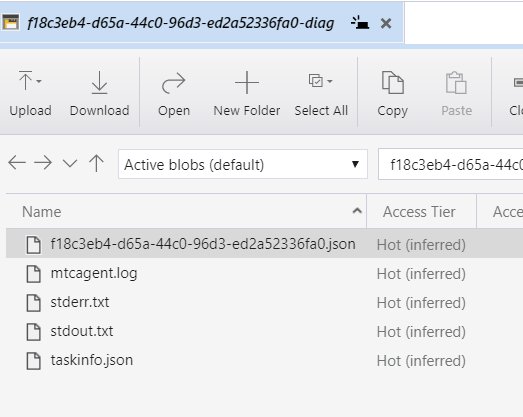
More information about getting diagnostics data can be found here
Restarted executions
An execution that takes longer than expected, or whose logs appear to start over, may have been restarted by the compute platform - for instance because its node was reclaimed or requeued. This is not something the execution itself requests, and the execution keeps its ID and status history.
Two things reveal it:
- An entry in the execution's status history, timestamped at the moment the restart was detected, naming the reason where the compute platform still reported one. This is usually the quickest check - it comes back with the execution details.
- An EngineExecutionRestartedMessage event, emitted once per restart and never for a first run. It carries the node involved, where the compute platform still says which it was - the detail to correlate against platform-side events.
Treat the diagnostics container with care after a restart. Diagnostics upload when the task process exits, so an attempt whose node was reclaimed - the process never exited - uploaded nothing, and the container holds only the new attempt. An attempt the compute platform retried because the process exited did upload, and the new attempt then overwrites those files one by one, so the container can hold a mixture of the two. Use the restart's timestamp in the status history to judge which attempt a file belongs to.
A restart is not a status of its own, so the status-history entry repeats the status the replaced attempt was in - identify it by its message, which names the reason, rather than by its status. It sits immediately before the new attempt's first entry.
Note that startedAt reports the start of the most recent runner start rather than of the execution, so the time between createdAt and finishedAt can be considerably longer than the reported run duration. That is true of any multi-setup execution, not only a restarted one, so it is not on its own evidence of a restart.
Review inputs to engine execution
Sometimes an execution can fail or give unexpected results because inputs are not passed correctly, are missing or are inappropriate for execution. To check and reevaluate execution inputs the GET/api/compute/execution/{executionId}/input endpoint can be used, where executionId is the ID of the corresponding engine execution.
{
    "inputs": {
        "inputs": [
            {
                "uri": "https://coreenginedev0inputs.blob.core.windows.net/data/lake-seq/lake2.m21fm",
                "localPath": "lake2.m21fm",
                "engine": "FemEngineHD",
                "version": "2024.1"
            },
            {
                "uri": "https://coreenginedev0inputs.blob.core.windows.net/lake-seq/lake.mesh",
                "localPath": "lake.mesh"
            }
        ],
        "options": {
            "poolType": "VM-S-5",
            "nodeCount": 1
        }
    },
    "isPlatformData": false
}
From the above response we could conclude that one of the URI's is incorrect: https://coreenginedev0inputs.blob.core.windows.net/lake-seq/lake.mesh should indeed be https://coreenginedev0inputs.blob.core.windows.net/data/lake-seq/lake.mesh
More information about checking execution inputs can be found here
Unexpected behaviour
The API is meant to be resistant to misuse, you should get problem details for things like executing non-existent engine or cancelling non-existent execution. If something surprises you, contact the team at wdpservice@dhigroup.com.